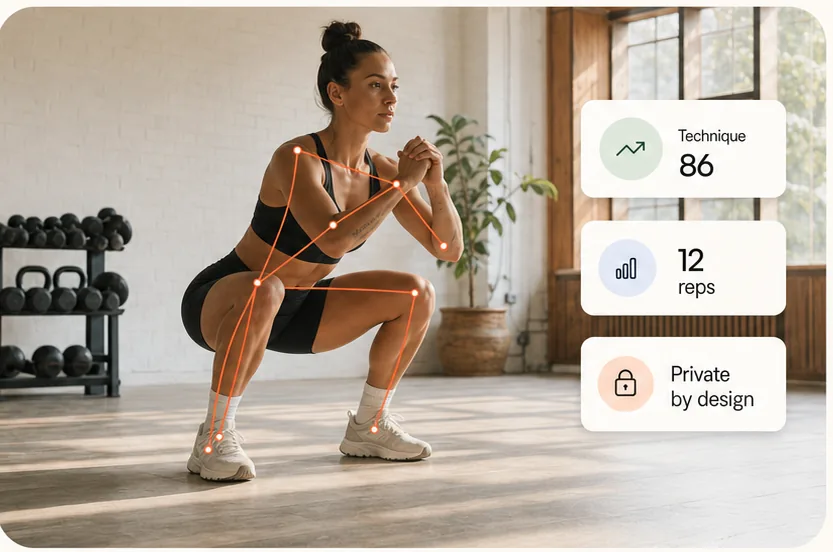
How computer vision exercise tracking works
A pose model estimates visible body landmarks such as shoulders, hips, knees, ankles and wrists. ScoreRep follows those landmarks across time, identifies movement phases and applies the rules configured for the selected exercise.
The same tracking foundation supports two workflows: live rep counting while you move and a structured review of a recorded set. The result stays tied to positions that can be checked against the original movement.
- Pose landmarks estimated from the camera image
- Exercise identification and eligibility checks
- Rep segmentation, timing and cadence
- Movement-specific criteria and visible evidence
Live workout tracking and rep counting
In a supported live station, pose tracking and rep counting run on the athlete device. The screen can show valid reps, no reps, elapsed time, tracking quality and movement guides during the set.
A complete movement cycle must cross the configured positions and timing boundaries before it counts. ScoreRep does not infer extra repetitions merely because the athlete is moving quickly or leaves the frame.
Recorded exercise analysis built around the movement
A squat and a deadlift should not be judged by the same checklist. ScoreRep uses exercise-specific rubrics, eligibility checks and key moments so the review reflects the movement that was actually performed.
Rep count, movement timing, criterion results and review frames are brought together in one result. History then makes repeated recordings easier to compare when exercise, framing and camera angle remain consistent.
Useful evidence for athletes, coaches and gyms
Athletes can review their own sets, while coaches can use the same result as a structured first pass before applying judgement about load, intent and training context. Gyms can use device-level tracking for live stations and shared challenges.
These audiences need different outcomes, so ScoreRep keeps the generic tracking method here and explains the coach and gym workflows separately.
How camera tracking compares with the alternatives
Camera analysis is one of four ways to record what happened in a set, and each of them is blind to something different. The useful question is not which is most accurate in general, but which one observes the thing you are trying to check.
A camera is the only one of the four that observes the movement itself rather than a proxy for it, and the only one whose evidence can be checked against the original video afterwards. It is also the one most easily defeated by a bad recording, which is why framing carries as much weight here as the model does.
- How coaches use the structured pass alongside their own judgement.
- What a gym gets back from device-level tracking.
| Approach | What it observes | What it needs | What it cannot see |
|---|---|---|---|
| Phone camera analysis | Visible joint positions, rep segmentation and movement-specific criteria | One phone, held still, with the whole athlete in frame | Anything outside the frame or hidden by equipment, clothing or another person |
| Wearables | Acceleration, heart rate and effort signals derived from them | A charged, paired device for every athlete | Depth, joint angles and position — the movement is inferred from motion, not observed |
| Manual video review | Whatever the reviewer chooses to look at, with full context | A phone, plus a coach’s time for every clip | Nothing in principle; in practice, the sets nobody has time to watch |
| Workout logs | Sets, reps and load as the athlete entered them | Nothing | Whether a rep written down as complete actually met the standard |
When camera tracking fails, and what it does then
Every failure of a camera-based system is a failure of visibility, and they are predictable enough to design around. ScoreRep withholds a criterion when the evidence for it is missing rather than estimating through the gap, so a result with fewer scored criteria is the expected output of a poor recording — not a lower score for the athlete.
ScoreRep publishes no single accuracy percentage, because one number across thirty movements, four camera angles and any gym’s lighting would not mean anything. The honest test is the one you can run yourself: count a set you have already reviewed and compare it with the automatic count on the same clip.
- A joint leaves the frame, so the criterion that depends on it cannot be scored
- Equipment, a bench or another athlete occludes the hip or knee at the decisive moment
- Loose clothing hides the joint line the rubric measures
- The camera moves mid-set, so positions between reps are no longer comparable
- The athlete is too far away, backlit, or lit from one side only
- The movement performed is not the movement selected, which the identity checks reject rather than score
What camera-based tracking can and cannot measure
Camera angle, lighting, framing and visibility affect pose quality. No single view exposes every joint relationship equally, so a reliable workflow matches the view to the movement and preserves uncertainty when evidence is missing.
ScoreRep provides educational movement feedback. It does not directly measure force, muscle activation, joint load or pain, diagnose injury, or replace a qualified coach or medical professional.